 Your Bizarre Adventure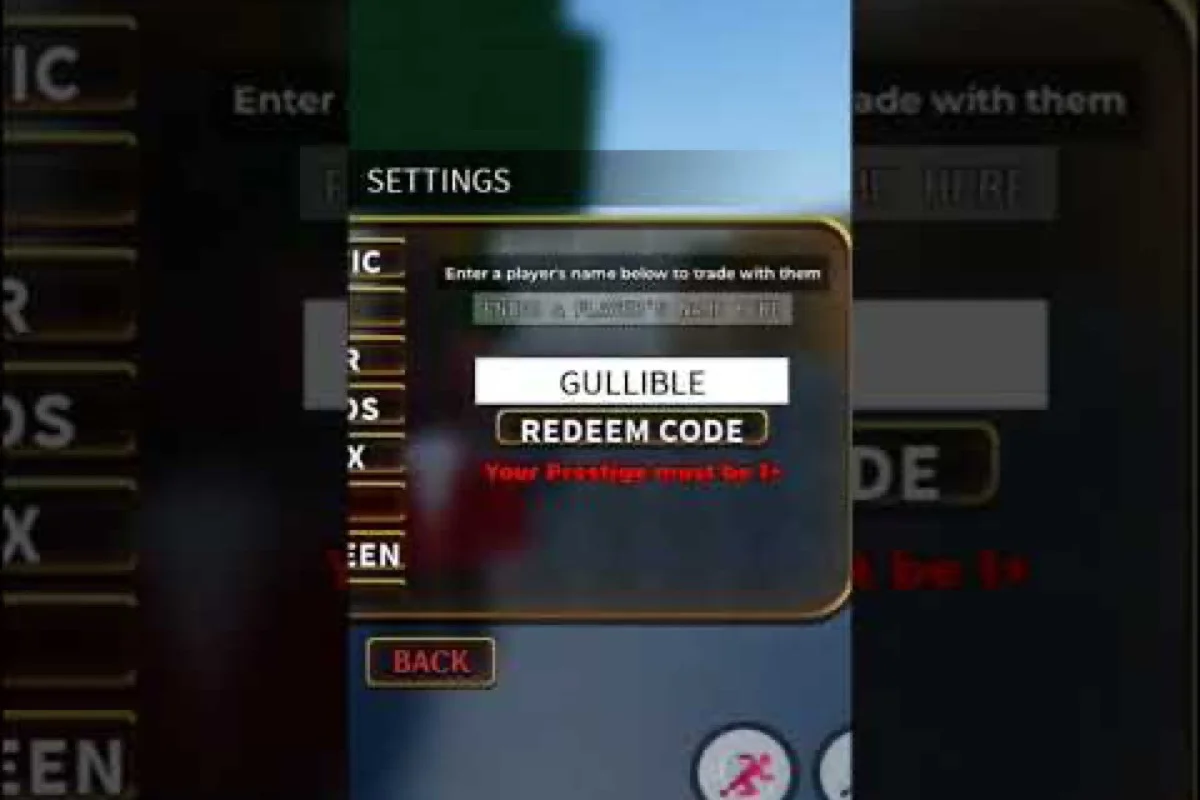
Pasting a code into Your Bizarre Adventure and getting nothing back is one of the most common frustrations in the community. Most of the time the code itself is fine — the problem is a Prestige gate, a typo, or a copy-paste that pulled in a stray space. This guide walks through every known reason YBA codes stop working, where the freshest drops actually appear, and how to confirm whether a code is live or dead before you spend another ten minutes troubleshooting.
Why YBA Codes Stop Working
Codes fail for a handful of repeating reasons, and most players hit the same handful over and over. The silent "Invalid" popup typically points to expired YBA codes pulled from old YouTube descriptions, region-locked strings shared on a foreign YBA Discord, or case-sensitivity errors when manually typing instead of copying. Typos, already-redeemed entries, and server-side throttling after rapid-fire attempts round out the usual suspects. Understanding the underlying cause saves a lot of guessing when a redemption returns that silent rejection.
Why a Prestige Requirement Blocks a Valid Code
The most common silent failure is a Prestige requirement. The official Trello board confirms that several active codes require the redeeming account to be at a specific Prestige level, and the game does not always show a useful error message. When an account falls below the threshold, the input is treated as invalid even though the code itself is functional.
| Code | Reward | Account Requirement |
|---|---|---|
| NOMICKEY | 1 Lucky Arrow | None (baseline) |
| GREATDAYS | 1 Lucky Arrow + 1 Redeemed Requiem Arrow | None (baseline) |
| GULLIBLE | 5 Lucky Arrows + C-Moon skin | None (baseline) |
| PARAGON NEW CODE PLS | 1 Lucky Arrow | None (baseline) |
| MORECODESTOCOME | 1 Lucky Arrow | Prestige 1+ required |
MORECODESTOCOME is the textbook example. New players copy it from a list, paste it in, and immediately assume YBA codes are not working on their device. In reality, the code is doing exactly what it was told to do — rejecting low-level accounts. If you sit below Prestige 1, every "Prestige-locked" code will return the same generic error until you reach the threshold.
Expired Codes Masquerading as Active Codes
A second silent failure is expiration. YBA codes do not carry a public timestamp, so community-maintained lists often contain entries that the developer silently retired weeks or months ago. Known expired examples that still float around in outdated lists include HALLOWEEN2025, CHRISTMAS2025, PARAGONLUCK, @PARAGON, 6YEARS, 5YEARS, 12 HOURS WITHOUT YBA, and ARE YOU WATCHING ME?. None of these will redeem in the current build, and the game offers no warning before rejecting them.
This is the most common reason a player believes YBA codes are not working when the truth is the code has aged out. Outdated third-party wikis and stale YouTube descriptions are the usual source of these dead codes. A list snapshot from 2026-10-17 confirms five codes are verified active, and that snapshot is the closest thing to a "live list" that the public record supports.
Typo, Whitespace, and Case Errors
A third category is plain human error. YBA uses case-sensitive code strings, and several codes contain spaces — including PARAGON NEW CODE PLS. If you copy from a page that has line-wrapped the string, the line break can travel with the selection and silently break the input. The redemption box trims some whitespace but not all, so a leading or trailing space is a frequent culprit.
Players who manually retype codes from a screenshot introduce capitalization errors at an even higher rate. The string PARAGON NEW CODE PLS is easy to mis-enter as Paragon New Code PLS or PARAGON_NEW_CODE_PLS, and both will fail silently. The community's standing recommendation is to copy from a verified source, then paste, then visually confirm the input box before pressing Redeem.
Confirming Whether a Code Is Live
Before troubleshooting your input method, your Prestige level, or your client, it pays to verify the code itself. Three signals reliably tell you whether a YBA code is currently active: pasting it into the Codes menu produces an "Invalid Code" error (the string is mistyped, truncated, or already redeemed on your account), the in-game "New" badge does not appear next to the corresponding reward (the entry has been rotated out of the live drop table), and the code is absent from both the official YBA Twitter account's pinned tweet and the #codes channel in the YBA Discord (the developers typically post new codes there within an hour of a patch or milestone drop).
The Official Channels Are the Source of Truth
The developer posts new codes on three platforms. New codes are typically announced first on the official X account (@KeeUzu), then echoed on the official YouTube channel (UzuKee) and pinned in the official Discord announcement channels. Anything you see outside these three channels is a re-share, and re-shares lag the original by hours or days.
A useful community heuristic: if a code is not on the official Trello, not pinned in Discord, and not mentioned on the developer's X within the last 30 days, treat it as suspect. The Trello primary board is updated the most reliably, and the secondary board carries cosmetic and event-related information.
A Quick Verification Workflow
Before testing any redemption, run the code through the same four-step loop that experienced YBA players use on the official Trello board, the #codes channel in the YBA Discord, the @KeeUzu X account, and a community-maintained live list — because codes listed in one place but missing from the Trello "Active Codes" column are almost always expired, region-locked, or typo'd, so the 30-second check prevents you from typing a dead string into the YBA code menu and getting the silent "Invalid Code" rejection that players mistake for a server outage.
| Step | Where to Check | What to Confirm |
|---|---|---|
| 1 | Official Trello primary board | Code listed under "Active Codes" |
| 2 | Official Discord #announcements or #codes | Code posted by a developer or mod within the last 30 days |
| 3 | Official X (@KeeUzu) timeline | Code referenced in a recent post |
| 4 | Community-maintained live list | Code present in a list updated within the last 7 days |
If the code appears in steps 1 and 2 but not 3, it is still considered active — X posts are lagging indicators, not gating signals. If it fails step 1, do not waste time testing it. The Trello board is the closest thing to a canonical registry that the public record supports.
Codes Posted "Today" vs. Codes Posted "Recently"
A frequent source of confusion is the phrase "new code today." Community curators often label a post as "new" if it is the most recent code in their static list, even when the post is several weeks old. Always check the actual post date on X or Discord before assuming a code is fresh. The developer's posting cadence is irregular — sometimes multiple codes drop in a week, sometimes a month passes with nothing — so "today" is a relative term in most third-party writeups.
Where New Codes Actually Drop
Knowing where to look is half the battle. YBA has exactly three official outlets, and unofficial outlets are mostly echoing those three with a delay. Treating the official channels as the primary source — and aggregators as a backup — prevents most of the "YBA codes not working" complaints that come from outdated lists.
Discord Codes Channel
The official Discord is the busiest source. The server has over 433,000 members, with around 110,000 typically online, and the announcement channel surfaces new codes the moment they go live. The advantage of Discord is the comment thread under each code post: players confirm in real time whether a code is redeeming, and a code that fails for many users is quickly flagged as expired or buggy.
The disadvantage is the noise. Discord search is slow, and pinned posts rotate. A useful habit is to scroll the announcement channel back through the last 30 days whenever you check, rather than relying on pins alone. Community-vetted codes in the YBA working codes list are also a fast way to skip straight to confirmed-working strings.
X / Twitter Codes
The official X account is where new codes often appear first. The developer occasionally posts codes as standalone tweets, sometimes as replies to community threads, and the cadence is tied to milestones — the developer has stated that the game's Roblox page reaching 1.25M likes will trigger another code drop. The Your Bizarre Adventure codes on Roblox index is a useful second stop after X for cross-referencing the most recent code string.
Because X search is keyword-driven and returns noisy results — tweets about "code," bug reports, and unrelated Roblox giveaways all surface in the same feed — the most reliable pattern is to load the @KeeUzu profile directly and scroll the "Replies" tab rather than the main timeline. Reply threads are where the developer most often drops bonus YBA code strings outside of standalone tweets, so this approach reduces the time spent sifting through community noise and minimizes the risk of pasting an already-expired code from a quoted RT.
YouTube Community Posts and Video Descriptions
The official YouTube channel posts community updates and event trailers, and codes are sometimes dropped into the description of an upload or a community tab post. This is the slowest of the three channels in terms of discoverability, because YouTube's search rarely surfaces community tab posts, but the descriptions of recent uploads occasionally carry a code as a bonus.
For event-specific drops like the Halloween and Christmas waves, the community tab and recent uploads are the first place those strings appear. The YBA Halloween code archive is a useful reference for past event drops if you want to compare cadence and naming conventions.
Step-by-Step Redemption Walkthrough
If you have a confirmed-live code and it is still being rejected, the redemption flow itself is a likely culprit. The in-game menu layout is not always obvious, and a misclick can land you in a different box that does not accept codes at all.
Open the Settings Menu From Inside a Server
Codes can only be redeemed while you are in an active server, not from the Roblox game page. Once you load into the world, look for the small menu icon in the bottom-right corner of the screen. Click it, then click the gear-shaped Settings icon on the left side of the popup menu. The redemption box sits at the bottom of the Settings panel, labelled "Enter a code to redeem here." Paste the string, double-check it against the source, and press Redeem.
The full walkthrough with screenshots is laid out in the how to redeem codes in YBA reference, which is worth bookmarking if you redeem codes often. That guide also covers edge cases that frequently look like "codes not working" bugs — such as the redemption textbox greyed out during a Cutscene Trigger, a fresh Stand Arrow pull, or while queued for a PvP match, all of which require you to leave the interaction before the field accepts input again.
Common Flow Mistakes
A handful of recurring mistakes lead to the "YBA codes not working" complaint even when the code, the account, and the client are all fine. The most common is opening Settings from the main menu before joining a server — the input box either does not appear or accepts text but never processes it. The second most common is pasting into the wrong box (the in-game chat input also accepts text and looks similar at small UI scales).
A third, less obvious issue is server hop timing. If the server you joined is in the middle of a Steel Ball Run race or a server-wide event, the redemption box can refuse input for a few seconds. Waiting for the next event tick, or simply joining a different server, clears the issue in nearly every case.
What the Success and Failure Messages Look Like
The game does not display a big green checkmark. A successful redemption flashes a short confirmation in the same popup, and the reward lands in your inventory on the next server tick. A failure flashes a brief "Invalid code" message and clears the input box. The failure message is identical for expired, Prestige-locked, typo'd, and case-mismatched inputs, which is why the underlying cause must be diagnosed separately.
If you receive the failure message but the code is on the verified-active list, your next step is to confirm your Prestige level, then re-paste from a clean source, then test on a different server. In that order — Prestige first, because it is the most common silent failure, then paste hygiene, then server state.
Comparing the Top Active Codes and Their Rewards
A side-by-side look at the verified-active codes makes it easier to choose which one to redeem first, especially since the YBA redemption codes reference often returns "code expired" or "yba codes not working" errors when players paste them with trailing spaces or before a server-side hotfix propagates to all shards. Some reward a single Lucky Arrow, while others bundle multiple high-value items or include an exclusive skin — the GULLIBLE drop in particular triggers the C-Moon skin unlock only on accounts below level 30, which is why newer players should redeem it before pushing past the Prestige 1 threshold that MORECODESTOCOME requires.
| Code | Lucky Arrows | Other Rewards | Skin Included | Account Requirement |
|---|---|---|---|---|
| NOMICKEY | 1 | None | No | None |
| GREATDAYS | 1 | 1 Redeemed Requiem Arrow | No | None |
| GULLIBLE | 5 | None | Yes (C-Moon) | None |
| PARAGON NEW CODE PLS | 1 | None | No | None |
| MORECODESTOCOME | 1 | None | No | Prestige 1+ |
GULLIBLE is the standout for new accounts because the C-Moon skin bundled with the five Lucky Arrows is otherwise unobtainable through normal play. GREATDAYS is the standout for mid-game accounts because the Redeemed Requiem Arrow cannot be acquired any other way — the Redeemed variant of every reward item is non-tradable, and codes are the only public source.
The YBA redemption codes reference has a longer history of retired codes with similar reward structures, which is useful for understanding how the developer tends to package drops — older entries like SPINNER and SORRY show a pattern of stacking 2–3 items per release (Lucky Arrows plus cosmetics) before Uzu soft-shifted toward single-item, account-gated bundles, making GULLIBLE and MORECODESTOCOME the closest inheritors of that earlier design.
Diagnosing Persistent Failures
When a code is confirmed live, your account meets the Prestige threshold, the input is clean, and the server is responsive — but the code still fails — you are in the rare edge case category. These account for a small share of total complaints, but they are worth walking through.
Server-Side and Client-Side Cache Issues
Roblox caches a surprising amount of state client-side, and a stale cache can hold the pre-update version of the redemption handler. The fix is to fully close the Roblox client (not just the game window), reopen, and rejoin. On mobile, force-closing the app is required; on console, a full app restart is required. Most cache-related failures clear after one or two full restarts.
Account Flags and Trade Restrictions
If the redemption returns an error that mentions trade restrictions or account standing, the underlying cause is almost always an account-level flag, not a code issue. The game is strict about cheat-related bans, and there is no public appeal process for code-related restrictions. The best path forward is to confirm the account is in good standing, then retry on a different network if the issue persists.
When to Wait and When to Report
Codes that fail for many players at once are usually a server-side bug, and the developer typically acknowledges these in the official Discord within a few hours. A useful community rule: if your code fails and at least three other players in the announcement thread report the same failure, wait for an official acknowledgment before assuming your client is the cause. Reporting a code as broken in a low-traffic thread tends to produce noise rather than resolution.
If you are the only player reporting a failure, the cause is almost certainly local to your client — common culprits include a stray space inside the code string, a missing or premature Prestige level requirement (most YBA codes require at least Prestige 1, while limited-event codes like the "3DG" Stand Skin require Prestige 4 or higher), or a stale client cache. Before assuming the code itself is broken, clear the Roblox cache, relaunch, and recheck the official YBA Twitter and Discord pins, because a single-character typo or pasted whitespace can silently invalidate an otherwise active code.
Keeping Your Code List Healthy
Long-term, the most efficient habit is to maintain a single trusted list rather than chasing new posts across every platform. Pick one of the three official channels as your primary source — most players settle on Discord because of the real-time comment thread — and treat the other two as backup verifiers. Update the list the moment a new code drops, and prune entries that have not been confirmed in the last 30 days.
The secondary benefit of a single trusted list is that you stop second-guessing the input. When you know the code is live and on your list, you can focus exclusively on the redemption flow rather than worrying about whether the code itself is the problem. Most of the "YBA codes not working" complaints vanish once the source list is reliable.
Frequently Asked Questions
Why is the YBA codes not working error showing even on a confirmed live code?
The most common cause is a Prestige gate, especially for codes like MORECODESTOCOME which require Prestige 1 or higher. A stale client cache is the second most common cause — fully close and reopen Roblox, then rejoin a server before retrying. If both are ruled out, paste the string from a clean source to rule out hidden whitespace, and try a different server to rule out a localized glitch.
How do I know when a YBA code has expired without a public timestamp?
The most reliable signal is absence from the official Trello primary board. Codes that have not been mentioned in Discord announcements or on @KeeUzu within the last 30 days should be treated as suspect. Community lists that still include known-retired strings like HALLOWEEN2025 or CHRISTMAS2025 are a strong indicator that the list is stale, even when the listed code itself is fresh.
Where do new YBA codes drop first?
New codes typically appear on the official X account first, then echo into the official Discord announcement channels and the official YouTube community tab. The official Trello board is updated after the social posts and is the most reliable canonical registry. Treat X as the speed leader, Discord as the discussion hub, and Trello as the source of truth.
Are YBA codes case-sensitive, and do spaces matter?
Yes to both. YBA uses case-sensitive code strings, and several codes include literal spaces — including PARAGON NEW CODE PLS. Avoid retyping from screenshots, and always copy from a verified source. If you must retype, double-check the exact casing and confirm that line breaks from a wrapped display have not crept into the selection.
Do YBA codes work on private servers?
Yes, as long as you are the account that owns the private server slot and your in-game account is loaded into that server. The redemption box behaves identically on private and public servers. The only restriction is that you must be in an active server, not on the Roblox game page, regardless of which server type you choose.